Mac network troubleshooting toolkit
IPNetMonitorX from Sustainable Softworks is a Mac OS X network troubleshooting toolkit for debugging Internet service problems and optimizing network performance. It includes 23 integrated tools that help users locate problems, gather diagnostic data, and work toward a fix either directly or through an Internet Service Provider.
Top Recommended Alternative

With its Macintosh-style interface, floating tool palette, and detailed TCP/IP displays, the application is best suited to administrators, IT professionals, and technically curious users who want a hands-on view of network behavior. Its interface may feel dated compared with newer network utilities, but the layout remains focused on quick access to diagnostic tools.
What can IPNetMonitorX diagnose?
IPNetMonitorX helps users examine reachability, routing, name resolution, DHCP behavior, server availability, traffic patterns, and local network devices. Address Scan can list active nodes on attached LANs, while Ping Look Around Scan can show Bonjour names, Ethernet hardware addresses, and device manufacturers for locally attached ARP-reachable devices.
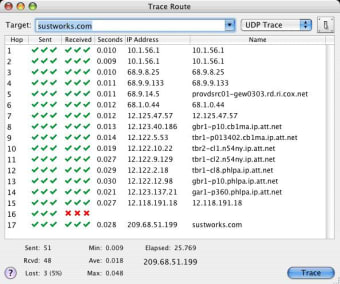
Other tools, including Ping, Trace Route, DNS-related utilities, Whois, Finger, Port Scan, Server Scan, Connection List, Interface Info, Monitor, TCP Info, and Link Rate, support both local troubleshooting and broader Internet diagnostics.
Does IPNetMonitorX require elevated permissions?
IPNetMonitorX does not require the user to log in as root. Even so, several tools expose detailed network information, including active connections, interface details, DHCP lease data, TCP behavior, and traffic activity. Features such as address scans, service scans, port scans, and server checks depend on what the user’s Mac can legitimately reach on the relevant network.
How useful is IPNetMonitorX for performance troubleshooting?
IPNetMonitorX is designed to show network behavior as it happens. Its fast, asynchronous, multithreaded design displays results as they arrive, and users can open multiple tools or multiple instances of the same tool at the same time. Monitor and TCP Info can plot transmit and receive data separately, while TCP Info also shows duplicate, retransmit, and control packets. Link Rate adds TCP/IP tuning indicators such as round-trip time, bandwidth-delay product, and one-second window size.
Detailed network diagnostics for Mac
IPNetMonitorX is a capable workstation-based toolkit for Mac users who need detailed network diagnostics in one application. It is especially useful for comparing route behavior, server availability, DHCP activity, TCP retransmissions, and interface traffic during troubleshooting. For hands-on network diagnosis, it remains a practical, technically detailed option.